A tool for tutorials without the development team
Fiscozen · 2026
Key info
Impact
Fixing one sentence in a guide could take days,
even when it was urgent.
Overview and context
Fiscozen is a digital platform with real accountants and tax advisors that helps freelancers and self-employed people in Italy deal with taxes, invoices and paperwork.
I designed and prototyped an internal editor that lets Fiscozen’s teams create, edit and publish customer guides on their own, without going through design and development every time. I built the prototype myself with Claude Code, connected to the company design system, so it already looks and behaves like the real product.
A bit of context
At Fiscozen we’ve always tried to guide users through their tax decisions. Over time this grew into a system of guides: some external, built on WordPress, others inside the app, from simple pages to multi-step flows.
Guides are linked to the tasks users receive and complete from their dashboard, like how to pay an F24 (an Italian way of payment for taxes) or how to report income to their pension fund.
The problem
The system grew without a shared structure, and every guide was expensive:
- Several systems. WordPress pages and in-app pages, with no single way to create and manage them.
- Weeks of research for each guide. Designers, PMs, tax experts and sometimes customer success had to break down the fiscal and legal steps and find the clearest way to explain them.
- Days or weeks of development to build each one.
- Every change was a relay. I drew the guides by hand in Figma, so even a small fix went from tax experts to product, then to me, then to developers. Often I was just passing the message along.
Design process
Finding what the guides had in common
I went through the existing guides to find recurring patterns: structure, content types, single-page or multi-step, and how they connect to tasks.
That’s where the idea of an internal CMS came from. The product team still sets up new guides, but the other teams can manage the content themselves, even if they’ve never used a tool like Figma.
Solution
A few more details
I kept the editor as small as the patterns allowed: a handful of building blocks, a live preview, and clear rules on who can publish.
A guide is built from blocks
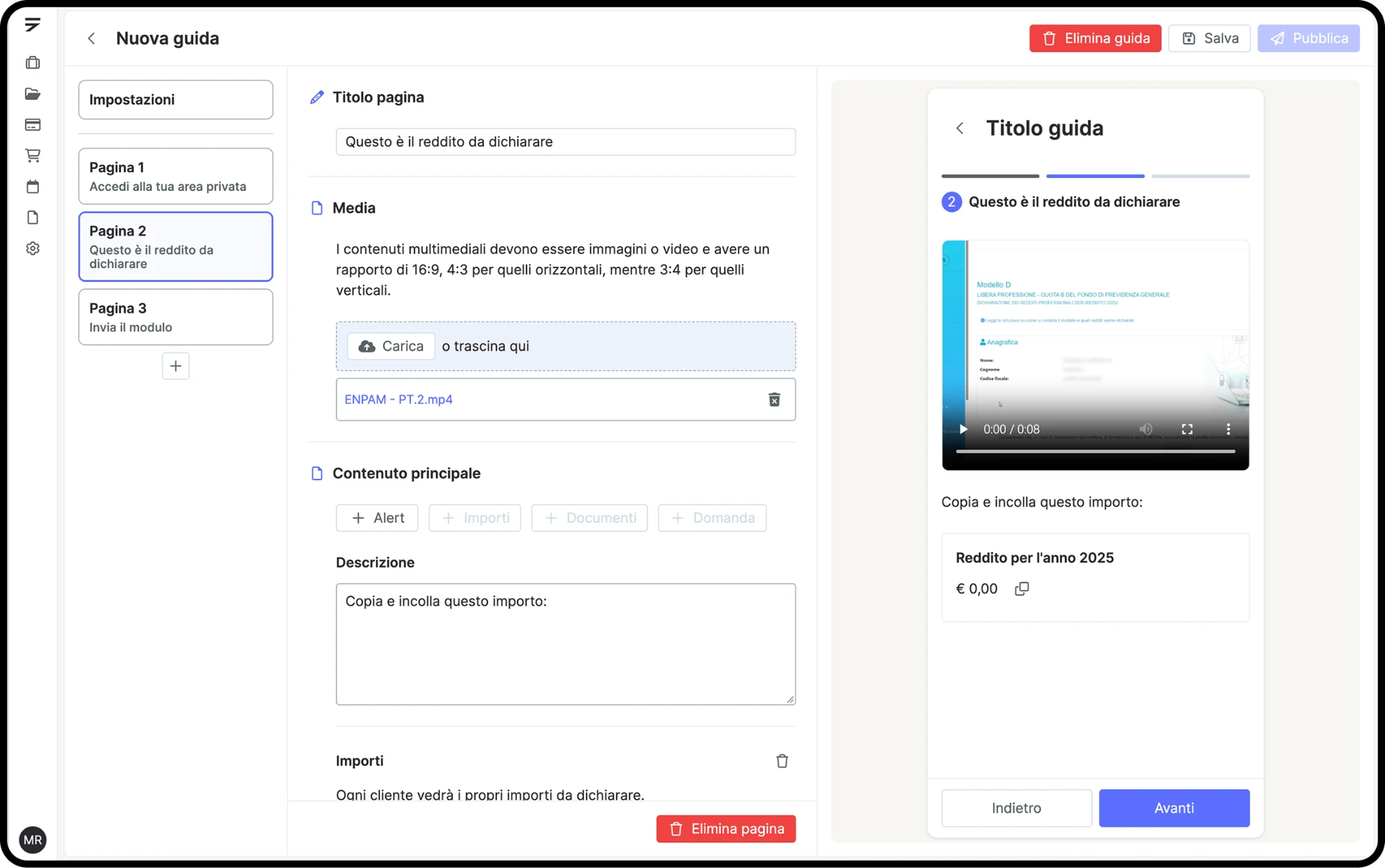
Content is made of simple blocks (title, paragraph, media) that you add, reorder or delete. I picked them from the patterns the existing guides shared, so whoever writes can focus on the content, not the layout.
Next to the editor there’s a mobile preview of the guide that updates as you type. Whoever changes a sentence doesn’t have to imagine the result or ask a designer to check it.
Guides for everyone, or for some customers
The first choice is who the page is for. Guides for all customers are general content, with no personal data. Guides for some customers are linked to a specific tax obligation and can show each customer’s own data.
Guides can be a single page or a sequence of steps, with a stepper in the preview. Each page is made of a description, alerts, documents to download or request, and questions.
Saving and publishing on their own
Drafts and publishing are separate: you work on a guide, save it, and publish it when it’s ready, with no developer release. Only the product team and the leads of the other teams (tax and customer success) can publish. That way the people who work on the content are independent, but every guide still goes through someone accountable before it reaches customers.
Constraints
Not every guide can be standardized.
Due to technical limits, in the first release I decided to allow to create only the simpler guides and to leave the more complex ones for later updates, as showing some data or information still needs custom development.
Impact and outcomes
This feature brings the time needed to create and develop a guide down from weeks to just a few days, ideally five.
Anyone with the right permissions can update the content directly, so a change no longer has to pass through several teams before it reaches customers. And with a standard layout, we no longer have to design a new one every time: each guide starts from the same blocks and is ready to publish faster.
Learnings
Building the prototype on top of the design system with AI let us validate the idea with the internal team showing them something that actually works, not mockups, and shortened the distance between design and development.